Phishing is when a scammer sends an email that pretends to come from someone you trust, such as your bank, a delivery company, a government agency, or a coworker, to trick you into handing over passwords, payment details, or personal information. It is one of the most common ways people lose money and accounts, and it works because the messages look real. This guide explains how phishing emails work, how to recognize them, and what to do if you have already clicked.
How email phishing scams work
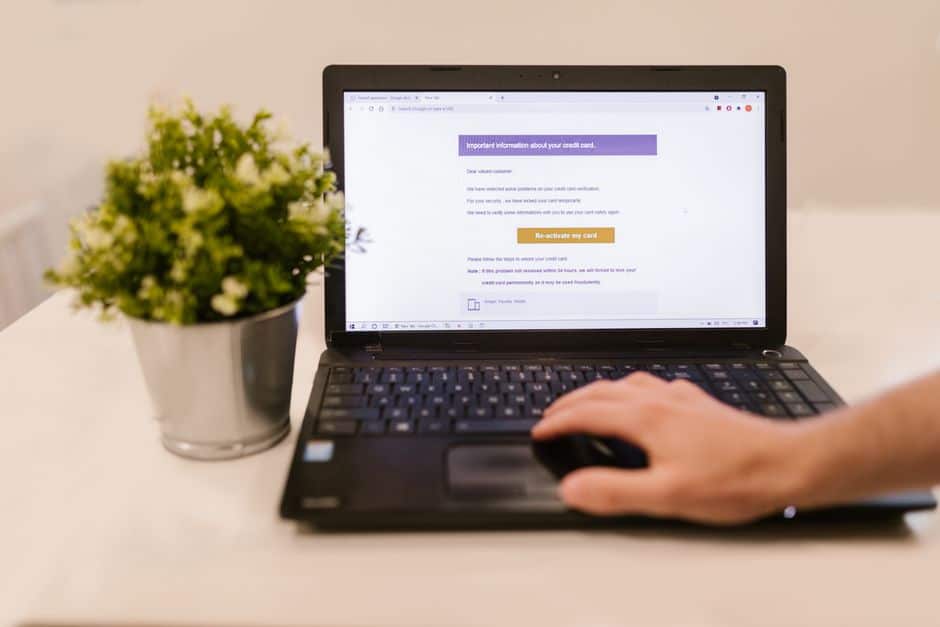
A phishing email usually has two parts: a believable disguise and a push to act quickly. The disguise might be a logo, a familiar sender name, or a message about your account. The push is a threat or a reward: “your account will be closed,” “unusual sign-in,” “package delivery failed,” or “you’ve won.” Clicking the link takes you to a fake website that copies the real one. If you enter your password or card details, the scammer collects them. Attachments can install malware instead.
What are 7 signs that an email might be a phishing attack?
- Urgency or threats. “Act now or lose access” is a classic pressure tactic.
- A mismatched sender. The display name says “Your Bank,” but the actual email address belongs to a random domain. Look at the address, not just the name.
- Links that don’t match. Hover over a link (don’t click) to see where it really goes. A misspelled or unrelated web address is a red flag.
- Unexpected attachments. Be especially careful with invoices, “scanned documents,” and zip files you weren’t expecting.
- Generic greetings. “Dear customer” instead of your name, although some scams do use your name.
- Requests for sensitive information. Real companies don’t ask for passwords, full card numbers, or one-time codes by email.
- Odd grammar, formatting, or too-good-to-be-true offers. AI tools have made scam emails more polished, so perfect spelling is no longer proof of safety.
What are the top email scams?
- Account security alerts claiming a suspicious sign-in and asking you to “verify” your login.
- Delivery notices about a missed package, with a link to “reschedule.”
- Invoice and payment scams with a fake bill or a request to update payment details.
- Impersonation of a boss or coworker asking for gift cards or an urgent wire transfer.
- Government or tax messages claiming a refund or a penalty.
- Spear phishing, a targeted version that uses your name, employer, or real details found online.
- QR code phishing, where a QR code in an email or attachment sends you to a fake login page.
How to check if an email is legitimate
- Don’t click. Go to the company’s website by typing the address yourself, or use its official app, and check for any alerts there.
- Check the sender’s actual email address and compare it with messages you know are real.
- Hover over links to preview the destination.
- Call the company using the phone number on your card, statement, or official website, not the number in the email.
- If it claims to be from someone you know, confirm with them by phone or text.
What is the difference between spam, scams, and phishing?
Spam is unwanted bulk email, usually advertising. A scam is any attempt to trick you out of money. Phishing is a type of scam that specifically tries to steal login details or personal information, usually by imitating a trusted sender. Spam is annoying; scams and phishing are dangerous.
What happens if you open a phishing email?
Simply opening an email is usually safe with modern email programs, because most block remote content. The danger is in what you do next: clicking a link, opening an attachment, or replying with information. If you only opened it, delete it and report it.
What to do if you clicked a link or shared information
- Disconnect if you opened a file. If you opened an attachment, turn off Wi-Fi and run a security scan.
- Change passwords right away. Start with the account the email imitated, then any account that uses the same password. Use a different, strong password for each.
- Turn on multi-factor authentication wherever it is available.
- Contact your bank or card company if you shared payment details, and watch statements for unfamiliar charges.
- Consider a credit freeze or fraud alert if you shared a Social Security number or other identity details. You can place a freeze for free with each of the credit bureaus, and the FTC’s IdentityTheft.gov walks you through recovery steps.
- Scan your device for malware with a reputable security tool.
- Report it (see below).
How to report a phishing email
- Use the “Report phishing” or “Report spam” option in your email program, which helps train its filters.
- Report it to the Federal Trade Commission at ReportFraud.ftc.gov.
- If you lost money, also file a complaint with the FBI’s Internet Crime Complaint Center at ic3.gov.
- Forward the email to the company being impersonated; many have a dedicated abuse address on their website.
How to protect yourself
- Use multi-factor authentication on email, banking, and social accounts.
- Use a password manager so you aren’t tempted to reuse passwords.
- Keep your operating system, browser, and security software updated.
- Be wary of any message that creates urgency, and take a minute to verify it a different way.
- Share this advice with family members, especially older relatives, who are often targeted.
If you are in Bonita Springs and want help securing your email, checking a suspicious message, or cleaning up after a scam, ZoeSquad TechSavvy can help in person or by remote support. We also offer patient senior tech support. See all our services.
You can also report phishing emails and sites to the Anti-Phishing Working Group and report suspicious pages to Google Safe Browsing.
Frequently asked questions
Are phishing emails illegal?
Yes. Phishing is a form of fraud and identity theft, which is why reporting it to the FTC and the FBI matters.
Can I get a virus just from opening a phishing email?
Rarely. The risk comes from clicking links or opening attachments. Still, delete the message and don’t interact with it.
Should I reply to a phishing email to tell them to stop?
No. Replying confirms your address is active and can bring more scams. Report and delete instead.